NEW IN 1.1 · AI EDITOR + FREE VIDEO EDITOR
What's new in CineFold 1.1
1.1 adds a full video editor, an AI Editor, studio-grade audio and generations that never get lost — on Mac and Windows.
Already using CineFold? The app updates itself to 1.1 — your license stays, and all 1.x updates are free.
With 1.1 the price is $149; existing license holders get 1.1 free (all 1.x updates are included).
Update 1.1.5
Reference images on Cloudflare, and a choice of agent model
The latest update. CineFold updates itself and shows what changed once, after the update.
Reference images on Cloudflare Pro
FLUX.2 klein 4B on your Cloudflare account now takes up to 4 reference images in Image, Shots and Studio. CineFold resizes them automatically.
Choose the agent model Pro
Pick the model in the provider menu at the top right: Gemini Flash or Flash-Lite (Google's free tier), Claude Sonnet or Haiku with your own Anthropic key, Claude via fal, Cloudflare Llama (free daily allowance) or another connected provider such as OpenAI, Groq, OpenRouter or Ollama. The menu shows whether each one is free or billed per token.
Gemini Flash by default Pro
If Google AI Studio is connected, the agent now uses Gemini Flash by default. You can switch back to Claude in the same menu.
“What's new” in the app Free
After an update, CineFold shows what changed once, in your language — together with the update status: check, download, restart to install.
Windows: smoother quitting and updating
Quitting and updating are more reliable, and CineFold uses less space in your roaming profile.
Update 1.1.4
Your data stays with your account
Made for computers that more than one person uses.
Separate for each account
API keys, projects, settings and the license are kept separately for each CineFold account on the same computer. Another account doesn't see them and doesn't get Pro from your license.
Sign in to activate
Activating a license key now needs you to be signed in. If you bought Pro with the same email, it turns on by itself when you sign in; if you used another email, link the license on your account page.
Sign out safely
Signing out hides your data from the next person. Tick “Also delete my data on this computer” to remove your API keys and local projects too. A generation that's still running stops and continues when you sign back in.
Nothing lost when you update
Everything you already had stays with the account that was signed in before the update — nothing is moved or deleted.
Update 1.1.3
Sign in with your CineFold account
Your license now comes from your account — no key to copy.
Sign in in your browser
Sign in with Google, Apple, Microsoft or an email link — no password is stored in the app. If the app doesn't open by itself afterwards, type the 8-character code shown in the browser.
Pro from your account
Bought Pro with the same email? It turns on automatically. Used another email? Link the license on your account page. A license key still works too.
Get Pro in one step
Get Pro opens checkout in your browser with your email filled in; when you come back, Pro is already on.
Your usage, your choice Free
Anonymous statistics stay anonymous. Linking your usage to your account is a separate option, off by default, in Settings → Privacy.
Update 1.1.2
New in 1.1.2
Includes everything from 1.1.1. CineFold updates itself.
Free AI images Free
Make images in Image Builder without a license — with your own free Cloudflare account, using FLUX.2 klein 4B (1:1, 16:9, 9:16, 4:5) or Flux Schnell (1:1). That's about 90 images a day with FLUX.2 klein 4B and about 170 with Flux Schnell on Cloudflare's free allowance, which Cloudflare may change. Free images are up to 1024 px and carry a small “Made with CineFold” watermark and an AI-generated tag in the file; Pro removes the watermark. The Start free guide in Image Builder walks you through the account and key.
Speed up to 100× Free
Speed from 0.05× to 100×, with presets from 0.1× to 20× and a custom value. Pitch is kept up to 4×; above that the sound turns off (you can turn it back on).
Cut at the skimming bar Free
While the yellow skimming bar is visible, I / O, Split (⌘B), Q / W, Freeze frame and From frame use its frame. You can turn this off in Settings → Editor.
Save the frame as an image Free + Pro
⇧3, right-click on the preview or the Export window: all layers at the project resolution as PNG / JPEG, into Images and the Library. Without a license: 720p + watermark, like video.
Green screen — tone memory Pro
Pick several tones with the eyedropper, sample from different frames or use Auto. Edge shrink / grow and copy / paste the key. Lit, shadowed and wrinkled screens come out clean in one go.
Project covers Free
Each project card gets a cover (the first meaningful frame, or one you choose), a skim preview as you move the pointer over it and the last edit time.
Export and text shadow fixes Free + Pro
Exports no longer stop with “Error initializing filters” on split clips with keyframes, and In–Out ranges keep their first frames in sync with the sound. Text shadows now show on small text too, with new Angle and Opacity settings and Padding for the background box.
New: video editor Free + Pro
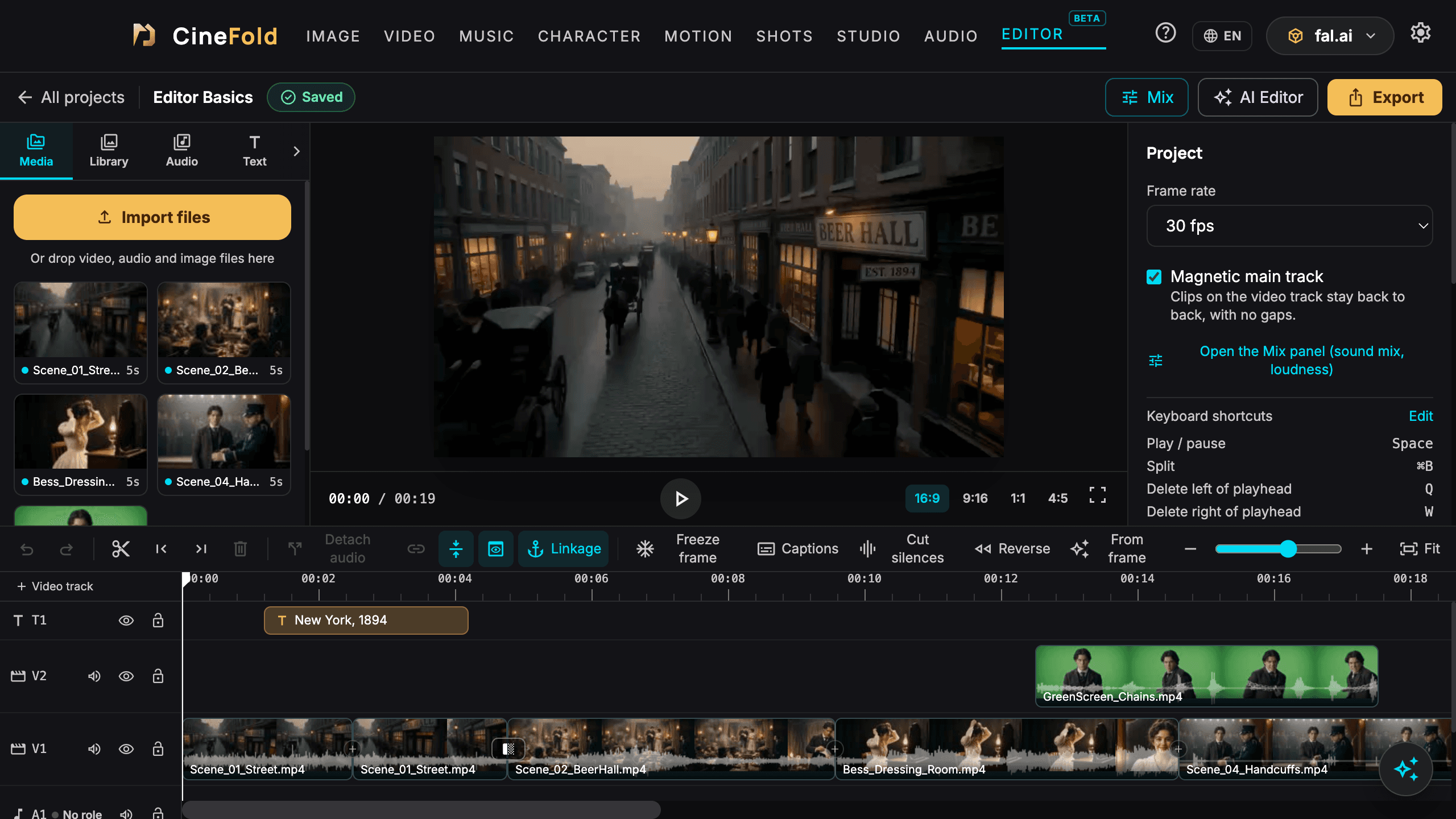
EDITOR in the top menu: cut and combine clips, export as a Short or a film (720p–4K, H.264 / HEVC). Multiple video tracks (picture in picture), blend modes, masks, keyframes, green screen, LUTs, color and filters, text styles and animations, transitions, stickers and templates. Everything runs on your computer; editing is free.

AI Editor (beta) Pro
Ask in plain words — “cut the silences and add captions”, “turn this into a 60 s vertical Short”, “reorder the scenes to tell the story”. Works with your own Claude / Gemini / OpenAI key; the result is a preview first, Apply is a single undo step; estimated cost and a limit before it runs.

Generations keep running in the background
Switching tabs, minimizing the window or closing the app while a generation runs doesn't stop it. Follow it in the Generations indicator in the top bar, get a notification when it's done and find the result in your Library — the builder card is still there when you come back. If the app was closed it's picked up from the provider on the next start; if the connection drops it keeps being checked — never charged twice. Only Cancel stops a generation.
Generate from frame Pro
Make a video or image from any frame, bridge two clips with an AI scene; regenerate, variation, extend.

Match colors to the first part Free
When you continue a shot part by part (Extend, or from its last frame), contrast, color and sharpness no longer drift; on by default, removable per clip in Properties.
Audio tools Free + Pro
Detach audio, noise removal, vocal / music separation, music ducking under speech, YouTube loudness (−14 LUFS), microphone recording.

Instrument separation Pro
Split a song into vocals + music, or vocals / drums / bass / (piano) / other — on your computer, in seconds. In the editor each part lands on its own track; in Audio Studio the parts are saved to your Library as WAV.

Sound mix Free + Pro
Give audio tracks a role (Dialogue / Music / Effects / Ambience — free); “Sort sounds” moves clips to the right tracks. Pro: per-role processing, Cinema / YouTube / Podcast / Social master presets (measured loudness and peak limit), one-click cinema mix, before / after listening and stem export (Dialogue / Music / Effects / Ambience + full mix WAV).

Generate audio from video Pro
Foley / ambience / ASMR from the picture of a clip or a selected range — with your own fal.ai or WaveSpeedAI key. Description, unwanted sounds, 1–4 variations to listen to and compare; replace the original audio or mix it in. Long ranges are generated in parts and joined into one audio clip.
Cut silences and filler words, auto captions Pro
Captions with the on-device engine in 99 languages — or your own OpenAI / Groq key; professional line and timing rules, important-word highlight, SRT.

Also new in the editor Free
Skimming preview (hover the timeline, the preview shows that frame — S), in / out points (I / O; export just the range or run tools on it), resizable panels, drag a clip between tracks to create a new track, reference images and saved characters in “Generate from frame”; no more flicker at cuts during playback.
Also new in the editor
In-app help Free
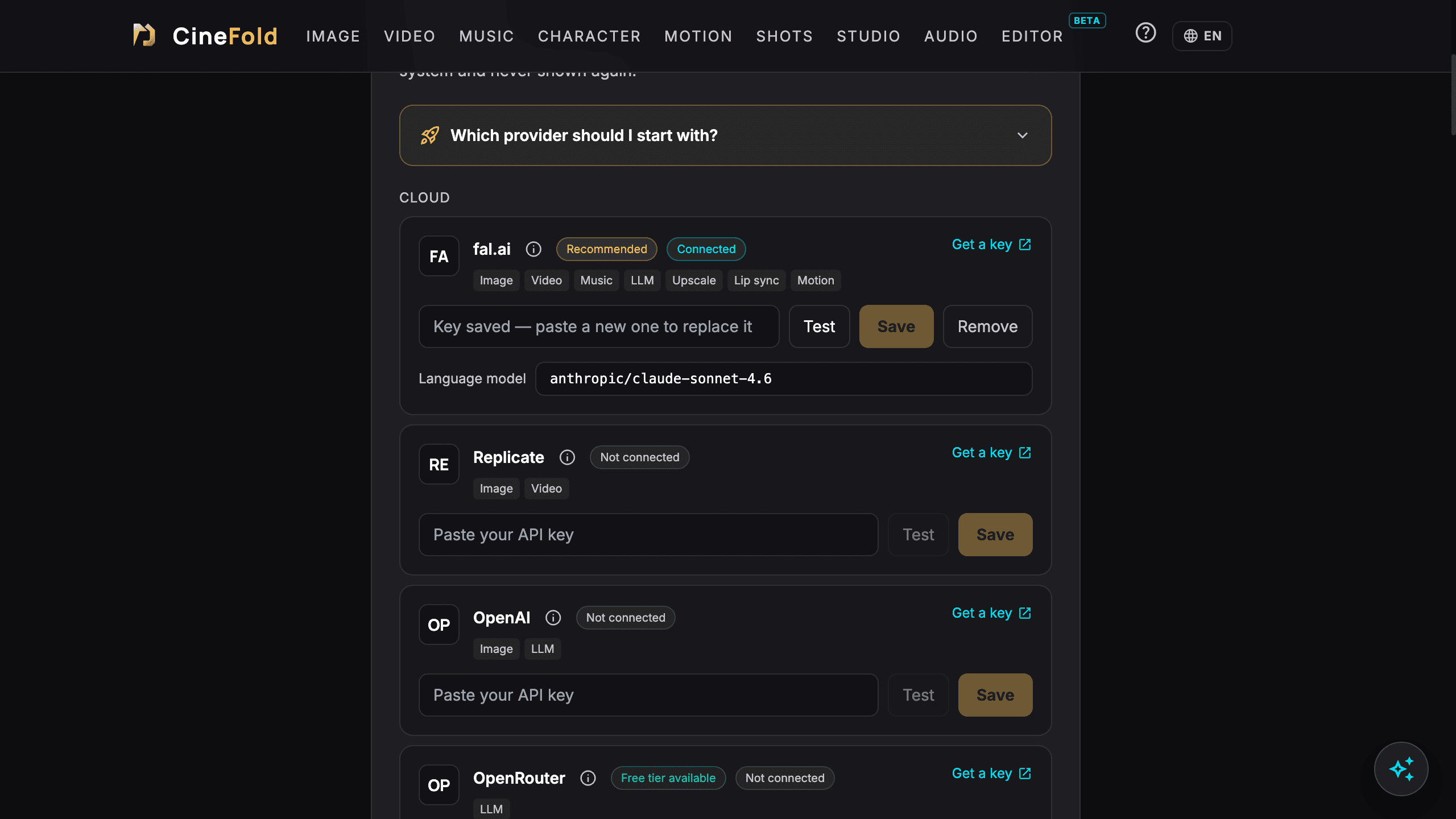
A “?” panel on every tab (search, shortcuts, tips), provider info cards and “Which provider should I start with?” in the API Center, short tours the first time you open a tab.
In-app help
Privacy Free
Anonymous usage statistics and error reports only if you allow them (off by default); turn them off, reset the install ID or “Delete my data” in Settings → Privacy. Optional email updates.
Smaller improvements
- Kling 4.0 shows audio as always included.
- Speech (text to speech, voice changer) is saved to the “Voice” folder instead of “Music”.
- Numbers follow the format of the interface language.
- App texts in all 9 languages.
- Without a license the editor exports at 720p with a watermark; Pro features can be tried in the preview.